Payables enable profit sharing within the platform. When your company receives its monthly commission payment, each payable will be listed as a line item along with the portion of profit they earned based on the percentage of base commission or markup assigned to them.
Payables do not need to be users in the platform, but users can be linked to payables for automated tracking of earnings.
By default, the primary payable associated with your business receives 100% of both base commission and markup until additional payables are added.
All commissions and markup earnings for your company are paid out monthly by paper check. Checks are mailed to the address associated with the company’s Administrator. Once received, your company will use the reporting tools built into the platform to determine how funds should be distributed to all Payables.
The Profit by Payable report provides a summary of the total commission or markup owed to each payable. For more information on reporting features, click here.
How Profit Is Distributed
There are two profit sources within every shop:
| Profit Type | Description | Who Controls It |
|---|---|---|
| Base Commission | A fixed portion of every sale earned by default | Shop Administrator (can be shared with Creator Payables for sales in shops they create) |
| Shop Markup | Any additional amount added on top of base pricing | Shop Creator (can be shared with Shop Payables or Creator Payables) |
Only 100% of each profit type can be shared. The platform will not allow more than 100% to be allocated for any individual sale. Unshared profits are automatically allocated to the primary payable.
Types of Payables
The platform supports two payable types:
| Payable Type | Created By | Earns Base Commission | Earns Markup | Must Be Linked to a User to Earn Funds |
|---|---|---|---|---|
| Creator Payable | Shop Administrator | Yes, if shared by the Shop Administrator | Yes (automatically 100% unless redistributed) | Yes, this payable requires shop creation to allocate funds. |
| Shop Payable | Shop Administrator or Shop Creator | No | Yes | No |
Creator Payables are typically used for internal users such as sales reps or team members.
Shop Payables are most often used for fundraising, rebates, or client profit-sharing.
Please note: Shop payables will only earn funds if markup is added to the products in the shop.
Directory-Level Commissions View (Shop Administrators)
The Commissions page at the directory level displays all payables associated with the company, along with the percentages assigned to each for base commission and markup.
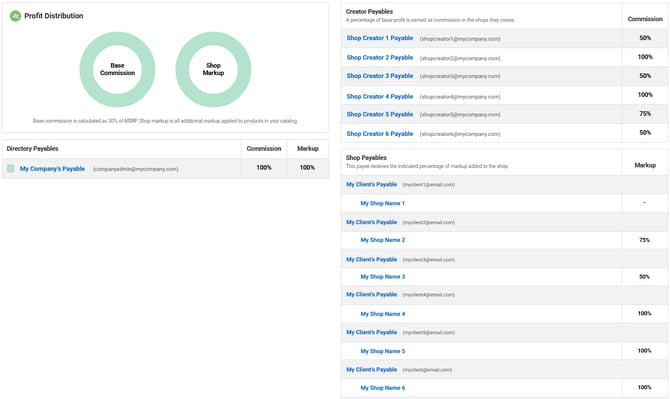
From this page, a Shop Administrator can:
-
View all payables connected to the company
-
Create new Creator Payables
-
Update commission percentages shared with Shop Creators for future shops
-
Verify that all funds default to the company payable unless shared
Only Shop Administrators have access to this page. Shop Creators do not have directory-level access.
Creating a Creator Payable
Creator Payables allow users who create shops to receive a percentage of base commission and (by default) 100% of any markup they add to every shop they create.
To create a Creator Payable:
-
Log in as a Shop Administrator
-
Click Users in the left navigation menu
-
Click New User Login
-
Click Commissions in the left navigation menu
-
Enter user name and email, and select Shop Creator from the list of User Roles
-
Click Enable profit sharing for this user
-
Click Save Changes
-
Verify the payee’s name and email address
-
(Optional) Enter address information for reporting
-
-
Enter the percentage of base commission to share
-
Click Save Changes
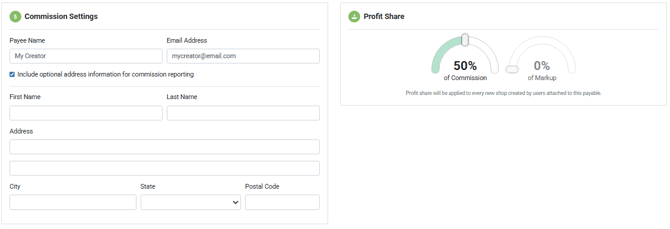
Once saved, the payable will automatically apply to all shops created by that user moving forward.
Please note: Changing the percentage later will not affect existing shops — only future ones. However, you can edit the percentage of commission shared with this payable from within each individual shops if you'd like to make changes to existing shops.
Markup will always be assigned to the creator by default unless manually shared with a Shop Payable.
Shop-Level Commissions View
Every shop has its own Commissions page where Shop Administrators and Shop Creators can view and manage profit sharing for that specific shop.
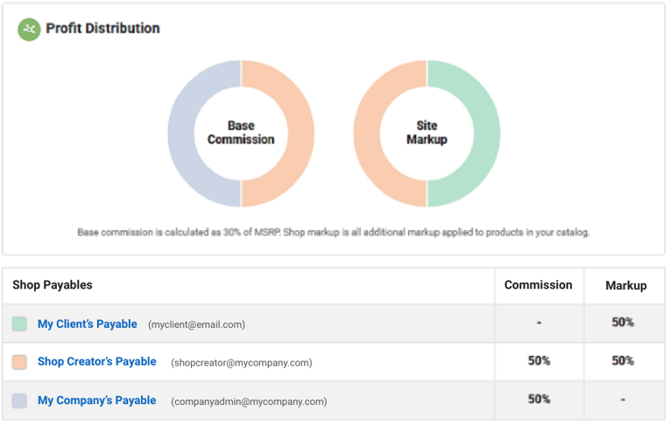
From this page, users can:
-
View current profit distribution for the shop
-
Create Shop Payables
-
Override Creator profit-sharing percentages that were inherited from the directory
Shop Creators can only edit payables they created. Shop Administrators can edit all payables.
Creating a Shop Payable
Shop Payables allow a portion of markup to be shared with a client, fundraiser group, or any other recipient.
To create a Shop Payable:
-
Go to My Shops
-
Select a shop
-
Click Commissions
-
Click Create Payable
-
Enter the payee’s name and email address
-
Enter the percentage of markup to allocate
-
Click Save Changes
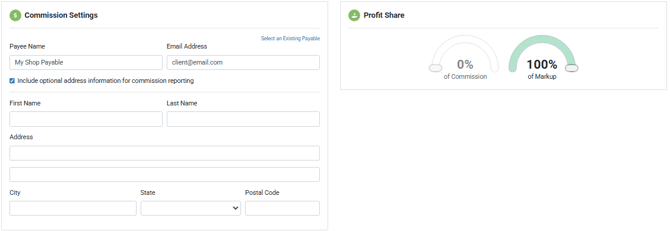
Please note: Shop payables cannot receive base commission. If no markup is added to the shop, the payable will not earn any funds.
Editing and Deleting Payables
-
Editing a Creator Payable at the directory level affects future shops only
-
Editing a payable at the shop level affects that shop only
-
The system will not allow more than 100% of commission or markup to be allocated
-
There is no limit to the number of payables you may add
If a payable is deleted, you will be prompted to migrate any remaining earnings to another payable before removal.
System Behavior and Rules
-
A payable is only linked to an existing record if the email address matches exactly
-
Multiple users can be connected to a single Creator Payable
-
Archived shops no longer generate earnings, but any previously earned profit will still be paid
-
Markup always belongs to the Shop Creator unless manually shared
-
All company payouts are issued by paper check once per month
-
There is no inactive status for payables — they may be deleted or set to 0%
Glossary
| Term | Definition |
|---|---|
| Payable | The record used to allocate shared profit |
| Payee | The name assigned to the payable |
| Base Commission | Default system profit on each sale |
| Markup | Additional profit added to product pricing |
| Shop Creator | User who created the shop |
| Shop Administrator | User who manages company-level settings |
| Profit by Payable Report | Reporting tool showing earnings per payable |
If you need assistance configuring a more advanced profit-sharing setup, please contact support@1300help.com