To upload artwork for print, submit a PNG file with a transparent background that is 11 inches wide by 13 inches tall at 300 DPI, using the sRGB color profile. These specifications ensure your design prints clearly at all standard product sizes on our DIGISOFT® production platform. The sections below cover each requirement in detail.
Important: The platform reproduces your artwork exactly as submitted. Files with insufficient resolution or opaque backgrounds will print precisely that way on the finished product. Review your file against the specifications above before uploading to ensure retail-quality results for your customers.
What are the artwork specifications for print?
- Dimensions: 11 inches x 13 inches
- Resolution: 300 dots per inch
- File Type: PNG image with a transparent background
- Colors: sRGB color profile
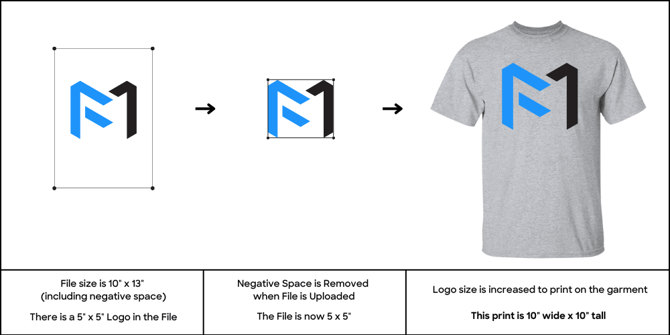
The dimensions of your file are determined by the tallest & widest points in your design that include pixels (or dots of color). We will remove all negative space in your design when it’s uploaded to our platform as demonstrated in the examples below.
Regardless of the dimensions of your file, your artwork will be scaled to fit the standard print dimensions for the specific garment type & size that’s ordered. For best print results, make sure your design is 11 inches wide and/or 13 inches tall so it can be printed on all products effectively. We will automatically scale your artwork down to fit products with smaller print sizes.
For tips specific to designing for our proprietary DIGISOFT® print technology, review the DIGISOFT® Design Guidelines and Best Practices (PDF).
When designing using text or fine lines, please ensure the lines used in your artwork are at least 6px at print size to ensure best adhesion, color accuracy, and washability.
Note:
While the system accepts various file types, vector files (such as SVG, AI, or EPS) may not render correctly when uploaded. For best results, export your design as a high-resolution PNG with a transparent background, as specified in the Artwork Specifications above.
What are the default print sizes by product?
- Adult Shirt Default: 11 x 13 inches (on size Large)
- Youth Shirt Default: 9 x 11 inches (on size X-Large)
- Adult Hoodie Default: 11 x 11 inches (on size Large)
- Youth Hoodie Default: 10 x 10 inches (on size X-Large)
- Left Chest (Large): 4 x 4 inches (on size Large)
- Left Chest (Small): 3.5 x 3.5 inches (on size Large)
- Youth Left Chest (Large): 4 x 4 inches (on size X- Large)
- Youth Left Chest (Small): 3.5 x 3.5 inches (on size X- Large)
- Shorts, pants, and bags: 4 x 3.5 inches (on size Large)
- Apparel Back Yoke: 3 x 3 inches (on all sizes)
- Tote Bags Default: 11.41 x 13 inches
We take care of image sizing for you, scaling your artwork to ensure your print size is proportional to the placement on your mockup regardless of garment size. The dimensions above represent the standard print size on size Large garments.
.png?width=670&height=179&name=Trimming%20%26%20Scaling%20(1500%20x%20400%20px).png)
What happens if I upload a low-resolution image?
Uploading a low-resolution image causes blurry or pixelated results on the finished garment. To avoid this, always supply a file that meets the 300 DPI specification at the full 11 x 13 inch canvas size.
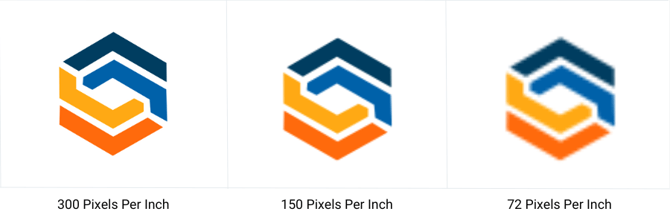
If your logo's source file is smaller than its intended print size, it will print at a lower effective resolution. Low-resolution files produce blurry or pixelated results on the finished garment. The examples below compare a high-resolution file (300 PPI) with a low-resolution file (72 PPI) at identical dimensions so you can see the difference.
Print size scenarios
In the first example, a file is uploaded that is smaller than the print size for a t-shirt. The negative space within the file is removed when the file is uploaded to the platform, which reduces the overall file size to match the size of the logo within it. When the design is printed, it’s enlarged to fill the print space for the t-shirt. If your logo is too small, it may cause the edges of your print to be less crisp when it’s enlarged for print.
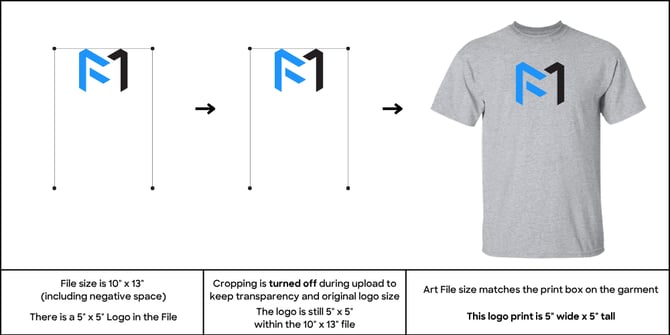
In the second example, the same logo is uploaded with file cropping turned off in Advanced Design Options.
By default, file cropping is turned on, which means the platform automatically removes surrounding negative space from your uploaded file before scaling. Turning file cropping off preserves the full canvas of your uploaded file — including any empty space — so the artwork is scaled based on the entire file dimensions rather than just the visible design area. To change this setting, open Advanced Design Options and toggle the file cropping control before uploading your artwork.
Please note: the logo is positioned at the top of the art file to ensure proper print placement. If the print should be positioned lower, please lower the design within your file.
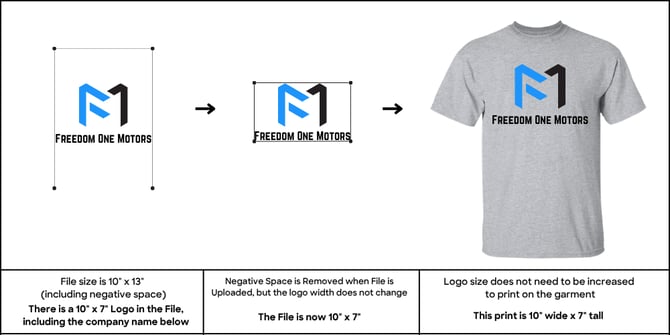
In the next example, the same logo size is used, but with the addition of full-width text below the logo. This text matches the full print width of 10”, which will ensure the logo size remains fixed & no scaling is required.
In this final example, the logo is resized to fit a Left Chest print placement. Because the artwork is wider than it is tall, it scales to the maximum Left Chest print width of 4.5 inches on size Large. To maintain the design’s original proportions, the print height is 2.8 inches. Note: The Left Chest default dimension listed above is 4 x 3.5 inches, while this example shows a maximum width of 4.5 inches. Actual print dimensions scale to fit your artwork's proportions; the table reflects the standard default size.
-1.png?width=670&height=335&name=Trimming%20%26%20Scaling%20(1)-1.png)