How are commission payouts processed?
Each month, MOQ1 issues a single check covering all commissions and profits earned across your shops, mailed to the address on file for the company's Shop Administrator. The Shop Administrator then uses the Profit by Payable report to verify the exact commission amounts owed.
The Shop Administrator follows these steps each payout cycle:
- Receive the mailed check at the address on file for the company's Shop Administrator.
- Open the Profit by Payable report to verify the commission amounts owed to each Shop Creator and Payable.
- Distribute funds to the appropriate Shop Creators and Payables.
What is the minimum payout threshold?
A cumulative commission balance of $100 across all of your company's shops must be reached before a check is issued. This threshold is calculated at the company level — not per individual shop. Any commissions below this amount carry over each month and are paid out automatically as soon as the $100 balance is reached.
What does the Profit by Payable report show?
The Profit by Payable report provides a summary of Total Commission owed to each Shop Creator and Shop Payable, as shown in the screenshot below.
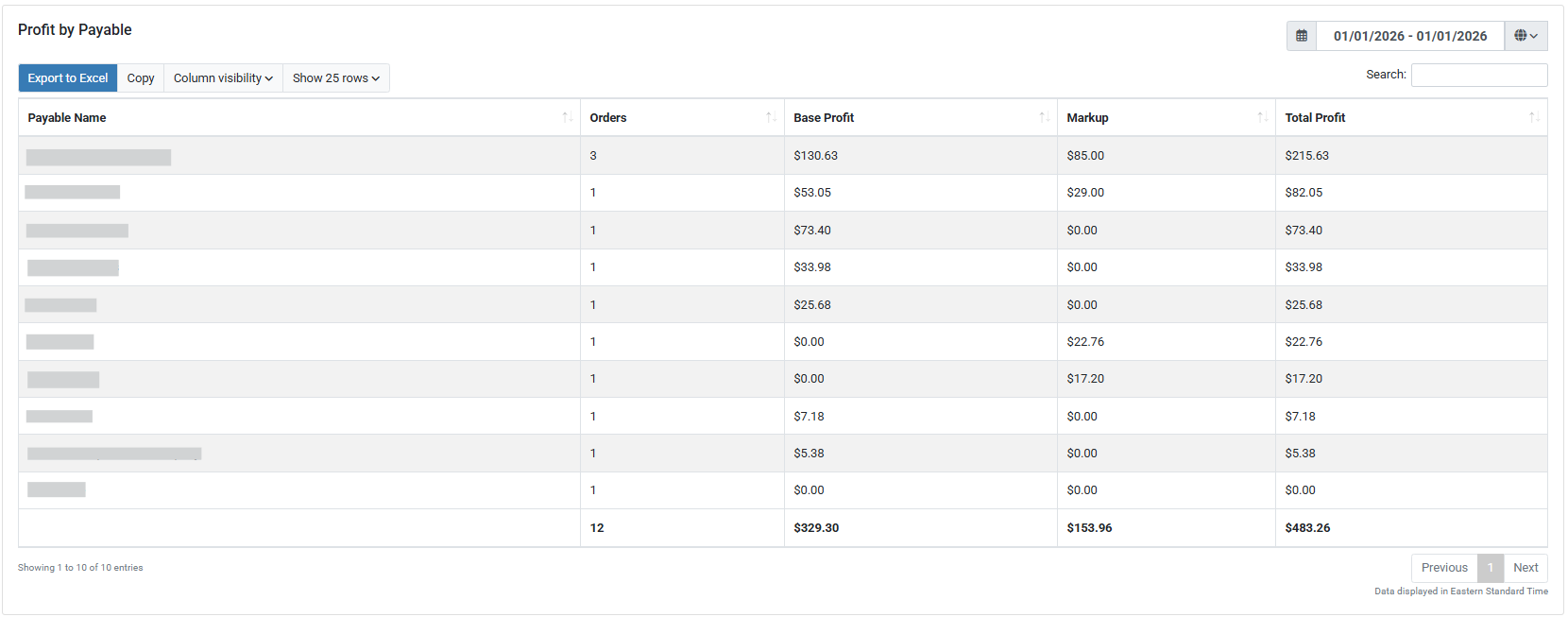
To access the Profit by Payable report, click Reporting in the left navigation menu, then select Profit by Payable from the list of available reports. For a full overview of all available reports, see Reports and Their Functions.