How do commissions work?
Your shop automatically handles all pricing, payments, and profit distribution — you never need to manage payments or coordinate with vendors directly. There is no out-of-pocket cost to you.
The price your customer pays automatically includes:
- Your commission
- The cost of the blank garment and decoration
- Sales tax
- Shipping
You do not need to submit payments or manage fulfillment partners, and there is no complex accounting required to track commissions.
How do I view my commission on a product?
To view your commission on a specific product, follow these steps:
- Go to Products in the left navigation menu.
- Browse the catalog and click the product you want to review.
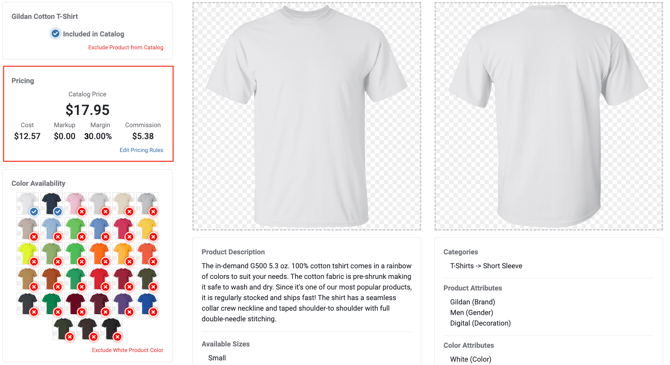
- Your commission amount, commission percentage, and any additional markup will be displayed on the left side of the product details page.
Who sets my commission rate, and can I increase it?
Your commission structure — the percentage of each sale you earn as profit — is set by the Site or Shop Administrator who invited you to the platform. You can also add markup on top of your base commission to further increase your earnings.
What is the difference between base commission and markup?
Your base commission is the fixed percentage of each sale set by your Site Administrator — for example, 30% of every order. You can add markup to every product in your shop, specific product categories, or individual products to increase your profit on each sale. Any markup you add is in addition to your base commission.
How do I share a portion of my profit with a client or for fundraising?
To share a portion of your markup with others, add a Payable. Adding a Payable lets you share shop profit with a client or run fundraising campaigns. When you create a Payable, you designate a percentage of your markup (not your base commission) to be paid out each time your shop makes a sale.
For a more detailed overview, see Profits and Commissions.