Note: Template Designs must be enabled for your site before use and are not available to all shops. Contact your account administrator to confirm eligibility. If Template Designs are not yet enabled, your administrator can submit a request through the platform's feature request portal.
Template Designs are system-generated designs automatically built using your shop's colors and text to match your brand. Using Template Designs is an easy way to offer a wider variety of designs in your shop without the added effort of creating them in a design program.
Before activating a Template Design in your shop, be sure to configure your Template Defaults in your Design Configuration settings. See the Configure Design Template Defaults tutorial for step-by-step instructions.
How to Add a Template Design
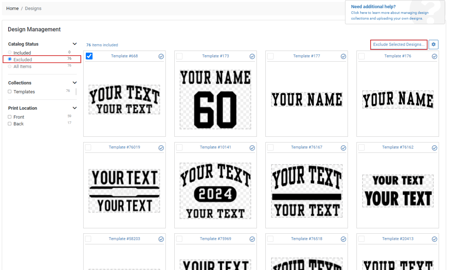
From your shop, click Designs in the left navigation menu. In the design manager, change the status filter at the top of the page to ‘Excluded’ to view available templates. If no templates appear, ensure Template Designs have been enabled for your shop and that your Template Defaults have been configured.
You can select individual design templates, groups of design templates, or entire design template collections to add to your shop.
After making your selection, click the Include Designs button at the top right of the screen to make them available in your shop.
Designs you add to your shop will be available for your customers to purchase on any of the products you’ve made available in your catalog.
For more information about managing your product catalog, see the Product Catalog Management tutorial.